Choose one integration problem
A robotics project brings together components with different responsibilities. A portfolio entry becomes easier to follow when it explains one path through those components: a reading arrives, the controller decides what to do, and an actuator receives a command.
This is a fictional writing example, not a tested robot or a customer case study. The diagram is an illustration already used in the Robotics template. The worksheet below contains no measured results. Adapt the structure to your own project and supply the evidence you have permission to share.
The scenario is a student rover project. The portfolio author owns the interface between a distance sensor and a motion controller; teammates own the chassis and navigation logic. The requirement is to reject missing or stale readings rather than continue issuing motion commands from old information. Physical stopping behaviour remains outside the example's verified scope.
Show the sensor-to-motion path
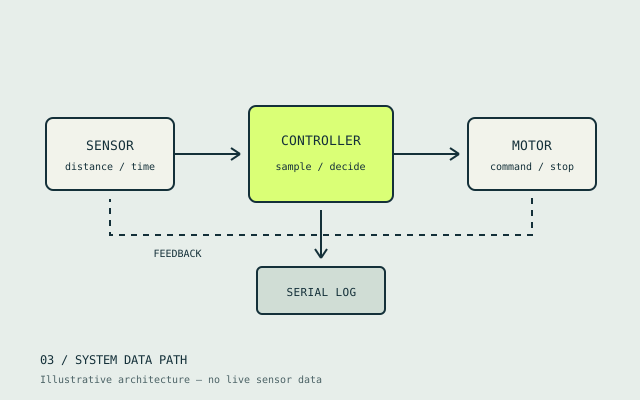
Open the subsystem diagram at full size.
This functional diagram is not a wiring plan or a safety-rated stop circuit. A software inhibit command alone does not establish that a physical robot stops safely.
Explain each boundary beside your own diagram:
- Sensor to input check: name the value, units, timestamp and the rule that determines whether the reading can be used.
- Input check to controller: describe the accepted message and what happens when a reading is invalid, absent or too old.
- Controller to driver: identify the command and which subsystem is responsible for applying it.
- Evidence: connect a recorded input to the resulting command. Explain how the records share a time reference, or disclose that they cannot be aligned.
If your project uses ROS 2, include the coordinate frames needed to interpret its data. The official tf2 introduction demonstrates frame relationships and tools for inspecting transforms. State your own ROS distribution and configuration. A tool's example output is not evidence from your robot.
Write the contribution and decision
Sample wording for the fictional entry:
I worked on the sensor-to-controller interface in a team rover project. I added an explicit validity and freshness check before readings could influence motion commands. My teammates developed the chassis and navigation logic. The entry explains the message format, the timeout rule and the checks completed in the stated test environment. Physical braking and hardware fault behaviour remain unverified.
Follow the summary with the choice you made. For example, keeping freshness handling at the receiving interface makes the acceptance rule visible in one place. Explain the actual alternatives you considered and why your project's timing requirements led to the rule you selected. Do not borrow a timeout value from this example: it has none.
Keep a repeatable test record
Before reporting an outcome, record the code revision, setup, configuration and input sequence. For a simulation, name the simulator and model. For a bench or physical trial, describe the conditions and follow your project's approved test procedure. This article is a portfolio writing guide, not a procedure for operating a robot.
Use a table like this with your own observations. Every outcome below is deliberately unrecorded.
| Check to document | Input or condition | Evidence to capture | Current status in this worksheet |
|---|---|---|---|
| Valid reading | A reading that meets the stated acceptance rule | Input record and resulting command | Planned; no outcome recorded |
| Missing reading | No new reading reaches the interface | Timing record and controller response | Planned; no outcome recorded |
| Stale reading | A reading fails the stated age rule | Timestamp, acceptance decision and command | Planned; no outcome recorded |
| Recovery | Valid input resumes after a fault | Transition record and the implemented recovery rule | Planned; no outcome recorded |
In your completed entry, distinguish the expected response from the observed response. A log showing an inhibit command does not by itself measure wheel motion or stopping distance. If you have a physical measurement, include its method, units and conditions separately. If a check failed, show what you learned and which revision changed the behaviour.
Choose supporting evidence
Use a permitted code change, a readable log excerpt or a short labelled video to support the account. Remove credentials and private data. Credit team members, libraries and starter code, and explain which part is yours. Test supporting links while signed out; a private repository cannot serve as accessible evidence for every reader.
Keep screenshots next to their context. A navigation route illustration is a design concept; a recorded trajectory needs its run conditions. Simulation can demonstrate the behaviour of the model you tested, but does not establish physical sensor performance, braking or reliability.
Turn the account into a portfolio entry
Use the robotics portfolio guide to select relevant projects, then preview the Robotics layout. Add your requirement, role, diagram, completed checks and remaining limits. Manual drafts are free; AI uses credits and publishing requires a paid plan.
The engineering portfolio website guide covers preparing and checking the published link. FolioBuild publishes a website; prepare a separate document if an application asks for a PDF portfolio. Before sharing, check that every claim in the entry matches your records and that unfinished work is labelled clearly.